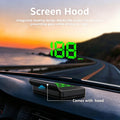
K1 HUD GPS Head Up Display for Car
K1 HUD GPS Head Up Display for Car
🔄 Returns Accepted Within 30 Days
⭐ Quality You Can Trust
❤️ Your Satisfaction Matters


BUNDLE & SAVE
Couldn't load pickup availability
-
Ordered
- - -
Order Ready
- - -
Delivered

K1 HUD GPS Head Up Display for Car
Keep Your Eyes on the Road, Not the Dashboard
Meet the K1 GPS Car Head-Up Display. View your real-time driving speed in a clear digital display positioned in your line of sight.

A Clearer Way to Check Your Speed
A practical dashboard upgrade designed to make important speed information easier to see during everyday driving.

Speed Information Right in Your Line of Sight
No more repeatedly glancing down at the instrument panel just to check your speed.
The K1 HUD places large digital speed readings in front of you, helping make everyday driving more convenient.
- Large, easy-to-read digital numbers
- Real-time GPS-based speed information
- A practical upgrade for vehicles without a factory HUD

Automatic Brightness Adjustment
The built-in light sensor detects surrounding brightness and automatically adjusts the display.
Enjoy a more comfortable viewing experience as lighting conditions change throughout the day.
- Adapts to changing ambient light
- Designed for daytime and nighttime use
- Helps maintain a comfortable display brightness

Built-In Screen Hood Helps Reduce Glare
The integrated screen hood helps shield the display from unwanted light, making the projected speed information more comfortable to view.
- Integrated shading design
- Compact dashboard-friendly shape
- Clean, modern appearance
Upgrade Your Dashboard with K1 HUD
Choose your preferred display color and speed unit on the product page before adding the device to your cart.
VIEW PRODUCT OPTIONS ↑Install in 4 Simple Steps
Get started with a straightforward setup. No complicated OBD connection or permanent dashboard modification is required.

Simple Plug-and-Play Setup
Follow the product instructions to position and connect your K1 HUD.
Connect the supplied USB cable to the K1 HUD.
Connect the cable to a compatible 5V USB power source in your vehicle.
Place the HUD securely on your dashboard.
Apply the reflective film if needed, then wait for the GPS signal.

Small Device, Useful Information
The compact K1 HUD fits neatly on your dashboard while displaying driving speed in large digital numbers.
Choose between the available green or white display light options.
- Compact body design
- ABS + PC construction
- Lightweight at approximately 40 g
- Convenient 1.5 m power cable
K1 HUD Specifications
Product information at a glance.
| Product Name | K1 GPS Car Head-Up Display |
| Model | K1 |
| Display Type | Digital GPS Speed Display |
| Display Color | Green / White |
| Speed Unit | MPH / KM/H (select variant when ordering) |
| GPS Technology | GPS + BDS Satellite Positioning |
| Input Voltage | DC 5V |
| Material | ABS + PC |
| Dimensions | 70 × 42.8 × 20 mm |
| Product Weight | Approximately 40 g |
| Power Cable Length | 1.5 m |
Everything You Need to Get Started
The package includes the essential accessories for setting up your K1 HUD.
Also includes 1 × User Manual.
Important Usage Notes
A few things to know before using your K1 GPS HUD.
Frequently Asked Questions
Helpful answers before setting up your K1 Car HUD.
Does the K1 HUD support MPH and KM/H?
Yes. Select the MPH or KM/H variant when ordering. The speed unit cannot be switched afterward using the device.
Does the K1 connect to my car through OBD?
No. The K1 uses GPS satellite signals to calculate vehicle speed and is powered through a compatible 5V USB connection.
Will it work in tunnels or underground garages?
GPS reception may be temporarily lost in tunnels, underground garages, or places where the sky is obstructed. The speed display may not update until the signal returns.
Why does the display show no speed?
This may happen when the device has not acquired a GPS signal. Move to an open outdoor area with a clear view of the sky and allow time for the signal to connect.
Why do I see a double image on the windshield?
A double reflection may occur when the reflective film is not used. Clean the windshield area and apply the included film according to the instructions.
Does the brightness adjust automatically?
Yes. The built-in light sensor automatically adjusts display brightness according to surrounding light conditions.
What vehicles can use the K1 HUD?
It is designed for many cars, trucks and SUVs with a compatible 5V USB power source. GPS reception is also required for speed readings.
Can I manually calibrate the displayed speed?
The K1 calculates speed directly from GPS data and does not support manual speed calibration.
Make Every Drive a Little More Convenient
Enjoy clear GPS speed information with a compact display and simple USB-powered setup.
BACK TO PRODUCT OPTIONS ↑